
Sign-up guide · About ten minutes
Your first Sunday shift, step by step.
From creating your church’s free account to greeting your officer on Sunday morning. Keep this page open beside the sign-up form and follow along.
- Free to sign up
- You approve every cost first
- Pay only for shifts you book

-
BEFORE YOU START
Have these four things ready.
Your church’s nameAs you want officers to see it.The church’s street addressWhere officers will report.Your mobile numberFor shift updates and the officer’s arrival.An email you checkYour login invitation goes there.Not sure how many officers or hours you need? Build your free safety plan first. It takes about three minutes and tells you where officers should stand and what it will cost.
-

The booking page opens in a new tab, so this guide stays open here. STEP 01Open our booking page.
Our booking page is illuno’s sign-up page for churches that come through Shepherd Security Group. illuno is the on-demand platform for off-duty police: it verifies the officers, pays them and builds liability protection into every shift.
- Press Enroll Now, at the top right or under the headline. Both open the same sign-up form.
- Signing up is free.
-
STEP 02
Fill in the sign-up form.
- First and last name: yours, as the person booking.
- Email and mobile: the ones you check most.
- Company Name: type your church’s name here.
- Search Address: start typing the church’s street address and pick it from the list. The street, city, state and ZIP fill in for you.
- Press Submit.
The form shows who referred you. That’s how illuno knows your church came through us, so we can help if anything gets stuck.
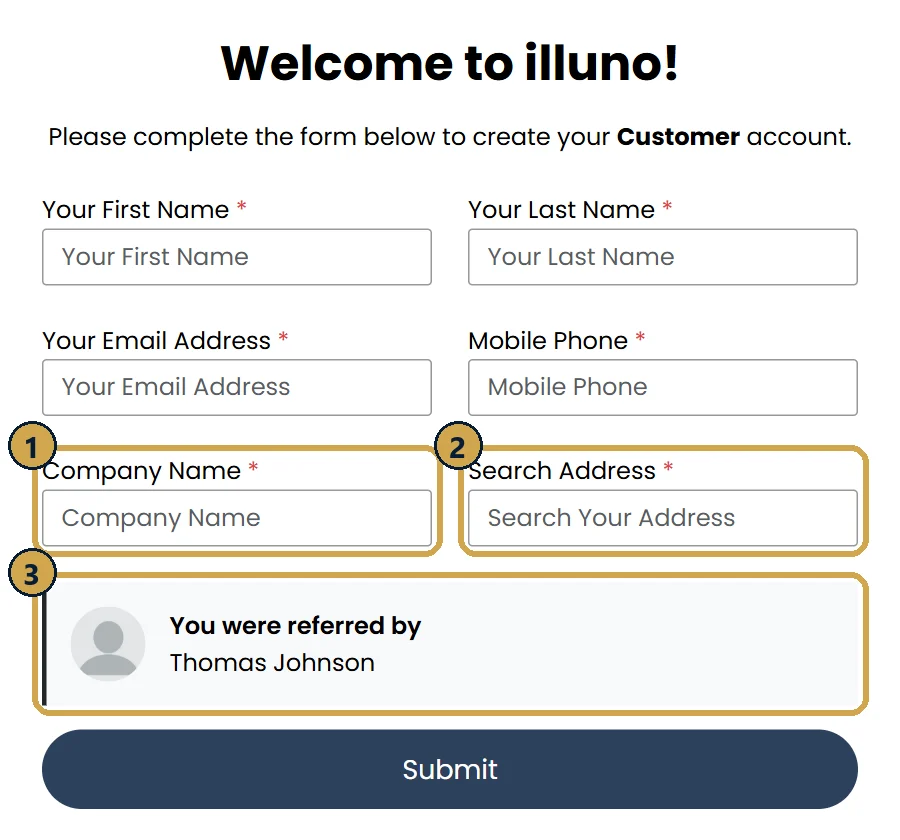
“Company Name” is where your church’s name goes. -
STEP 03
Check your email and log in.
- Look for an email titled “illuno Invite”. It usually arrives within a few minutes. Check your spam or junk folder if you don’t see it.
- Follow the link in the email to set your password.
- From then on, log in at app.illuno.com on any computer or phone.
No email after an hour? Write to illuno at support@illunoondemand.com, or send us a message and we’ll chase it for you.
-
STEP 04
Create your first event.
In illuno, a Sunday is an event, and each officer you need is a shift in it.
- Name the venue and pick the date: your church, and the Sunday you want covered.
- List the shifts. Have each officer arrive 30 minutes before your first service and stay until the lot is clear after the last one. Off-duty police jobs usually run at least three hours.
- Say where each officer is needed: main entrance, parking lot, traffic at the exit, the children’s hallway, or roaming the grounds. Add where to park, who to ask for and which door to use.
- Approve the cost. Your event stays a draft until an illuno coordinator reviews it, sets the rate and sends you a full cost breakdown. Nothing goes out to officers until you approve it.
Post a few weeks ahead. Same-week fills are possible, but illuno says earlier posts usually fill best. Post Easter and Christmas Eve earlier still.
-
STEP 05
Watch it fill, then welcome your officer.
- Once your event is posted, verified officers nearby claim the shifts in order, and you watch the fill status live. You don’t pick officers by hand.
- On Sunday, have your safety team leader or an usher meet the officer at the door.
- Spend two minutes on the officer briefing card: where the children are, who leads your safety team, where the AED is, and anyone who may not be present.
- illuno handles the officer’s pay, your invoice and the tax paperwork. You don’t pay the officer directly, and every shift stays on record.
Stuck, or want us to walk you through it?
Send us a message and we’ll help you get set up, or answer questions from your board.